Saturday, March 16, 2013

What is a Trigger?

Trigger


  •  is a procedural code that is automatically executed in response to certain event in database
  • custom code that fires when a record is created, updated or deleted.
What happens when you hit "Save"?

1. Old values are written
2. System Validation Rules
3. Apex (before) Triggers
4. Custom Validation Rules
5. Record Saved to DB (Not Saved)
6. Record reloaded from DB
7. Apex (after) Trigger
8. Assignment Rules
9. Auto-Response Rules
10. Workflow Rules
11. Escalation Rules
12 Rollup Summary Formulas updated
13 Database Commit
14. Post commit logic(Sending Emails etc)

Cannot control the logic within each group.

Write triggers only when everything fails to solve the issues.

Big replacement for triggers are -

Workflow rules. 
It can
     - Update field
     - Assign task
     - Send Emails
     - Send outbound messages (Integration)

Workflow rules can't -
1. Create other records - Automatically create other records
2. Complex calculations - Calculate total revenue from child accounts
3. Automatically submit records for approval.
4. Delete records


Thursday, March 14, 2013

Cloud Computing Elements


  • Public cloud

    It is a set of hardware, networking, storage, service, and interfaces owned and operated by a third party for use by other companies or individuals.

  • Private cloud 

    It is a set of hardware, networking, storage, service, and interfaces owned and operated by an organization for the use of its employees, partners, and customers.

  • Hybrid cloud

    In a hybrid cloud environment, an organization combines services and data from a variety of models to create a unified, automated, and well-managed computing environment.


Cloud Computing Models


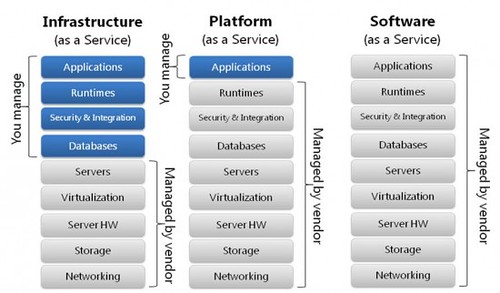
  • Infrastructure as a Service (IaaS). 

    The IaaS layer offers storage and compute resources that developers and IT organizations can use to deliver business solutions.
  • Platform as a Service (PaaS). 

    The PaaS layer offers black-box services with which developers can build applications on top of the compute infrastructure. This might include developer tools that are offered as a service to build services, or data access and database services, or billing services.
  • Software as a Service (SaaS).

     In the SaaS layer, the service provider hosts the software so you don’t need to install it, manage it, or buy hardware for it. All you have to do is connect and use it. SaaS Examples include customer relationship management as a service.


What Is Cloud Computing?

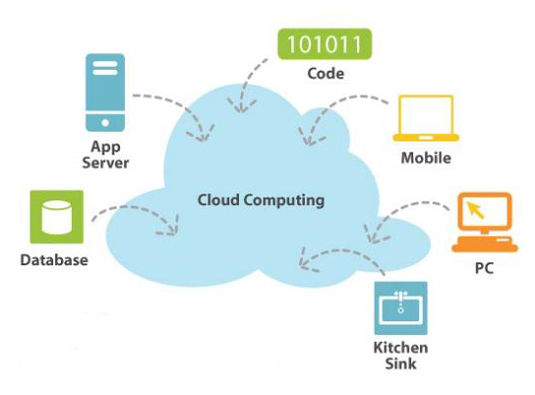
Cloud computing is the next stage in the Internet's evolution, providing the means through which everything — from computing power to computing infrastructure, applications, business processes to personal collaboration — can be delivered to you as a service wherever and whenever you need.

The “cloud” in cloud computing can be defined as the set of hardware, networks, storage, services, and interfaces that combine to deliver aspects of computing as a service.

Cloud computing has four essential characteristics: 

  • Elasticity and the ability to scale up and down, 
  • Self-service provisioning and automatic deprovisioning
  • Application programming interfaces (APIs), 
  • Billing and metering of service usage in a pay-as-you-go model.

Cloud computing is offered in different forms:
  • Public clouds
  • Private clouds,
  • Hybrid clouds, which combine both public and private.


Sources - http://www.dummies.com

What is SaaS?


Software as a service (or SaaS) is a way of delivering applications over the Internet—as a service.

SaaS applications are sometimes called Web-based software, on-demand software, or hosted software. 

Whatever the name, SaaS applications run on a SaaS provider’s servers. The provider manages access to the application, including security, availability, and performance.

Notable SasS provides -


Benefits of the SaaS model include:
  • easier administration
  • automatic updates and patch management
  • compatibility: All users will have the same version of software.
  • easier collaboration, for the same reason
  • global accessibility.

What is PaaS?

Platform as a service-- or PaaS-- is a proven model for running applications without the hassle of maintaining the hardware and software infrastructure at your company.

Examples of PasS -


  • Force.com from SalesForce: based on the SalesForce SaaS infrastructure and Apex language
  • WaveMaker: visual development studio based on Java and hosted on Amazon EC2

Business benefits of PaaS
  • Cost savings
  • Shortened application delivery
  • Increased adaptability


At its core, Platform as a Service (PaaS) eliminates the expense and complexity of evaluating, buying, configuring, and managing all the hardware and software needed for custom-built applications.


What is Apex?

Apex is a strongly typed, object-oriented programming language that allows developers to execute flow and transaction control statements on the Force.complatform server in conjunction with calls to the Force.com​ API.

Apex code can be initiated by Web service requests and from triggers on objects.

All Apex runs entirely on-demand on the Force.com platform, as shown in the following architecture diagram:

Apex is compiled, stored, and run entirely on the Force.com platform.


Apex provides built-in support for common Force.com platform idioms, including:
  • Data manipulation language (DML) calls, such as INSERTUPDATE, and DELETE, that include built-in DmlException handling
  • Inline Salesforce Object Query Language (SOQL) and Salesforce Object Search Language (SOSL) queries that return lists of sObject records
  • Looping that allows for bulk processing of multiple records at a time
  • Locking syntax that prevents record update conflicts
  • Custom public Force.com API calls that can be built from stored Apex methods
  • Warnings and errors issued when a user tries to edit or delete a custom object or field that is referenced by Apex